English







Many people want to save money every month. However, they often do not know how much they will get at the end. A Recurring Deposit (RD) solves part of this problem. You deposit a fixed amount every month, and the bank pays interest on it.
Still, customers ask the same question again and again: “How much will I get in the end?” This is where an RD calculator helps. It shows the RD maturity amount in seconds. Moreover, it removes the need for hard math.
For Direct Selling Agents (DSAs), this tool is very useful. Besides saving time, it builds trust. Similarly, the right agent communication tools help you share results in a clear way. In this blog, you will learn how the calculator works, how to explain results, and how to avoid common errors.
What Is an RD Calculator?
An RD calculator is a free online tool. It tells you how much money you will get when your RD ends. Therefore, you do not need to work through long formulas.
You enter three basic details: the monthly deposit, the interest rate, and the tenure. Then the tool shows your RD maturity amount and your total RD interest. In addition, most tools show how much you deposited in total.
For example, a customer may want to save ₹5,000 every month for one year. Instead of guessing, they can check the RD returns right away. As a result, they can plan better.
How Does an RD Maturity Calculator Work?
The tool uses a set formula. Banks usually add interest to an RD every quarter. Hence, the calculator uses quarterly compounding in its steps.
First, you type in your details. Next, the tool applies the interest rate to each monthly deposit. Then it adds the interest earned to your balance. Finally, it shows the RD maturity value on the screen.
Meanwhile, the calculator handles all the tough work in the background. You only see a simple answer. Because of this, even first-time savers can use it without help.
Further, you can change the numbers as many times as you like. For instance, you can raise the monthly amount or extend the tenure. Consequently, you can see how each change affects your RD returns.
How to Calculate RD Maturity and Returns
You can also do the math by hand. This helps you understand what the tool does. The common formula is:
M = R × [(1 + i)^n − 1] ÷ [1 − (1 + i)^(−1/3)]
Here is what each letter means:
- M is the maturity amount.
- R is the monthly deposit.
- i is the interest rate per quarter (the yearly rate divided by four).
- n is the number of quarters in the tenure.
Let us look at an example. Suppose a customer deposits ₹5,000 every month for 12 months. The rate is 7% per year. First, we find i: 7% ÷ 4 = 1.75% per quarter. Next, we find n: 12 months make 4 quarters. After that, we put the numbers in the formula.
| Detail | Value |
| Monthly deposit | ₹5,000 |
| Tenure | 12 months |
| Interest rate (example) | 7% per year |
| Total amount deposited | ₹60,000 |
| Approx. RD interest earned | ₹2,300 |
| Approx. RD maturity amount | ₹62,300 |
This is only an example. Actual figures depend on the bank and its rules. Therefore, always check the current rate before you share any number with a customer.
Understanding RD Interest and Maturity Amount
Many customers mix up these two terms. So, let us make them clear.
RD interest is the extra money the bank pays you. In other words, it is your reward for saving. The maturity amount is the full sum you receive at the end. It includes all your deposits plus the interest.
Here is a simple way to say it: Maturity amount = Total deposits + Total interest.
Similarly, some customers think RD returns and RD interest are different things. In most cases, they mean the same thing. RD returns simply show the gain on your savings.
Moreover, the interest rate has a big role here. A higher rate gives higher RD returns. In the same way, a longer tenure gives interest more time to grow. Hence, both choices matter.
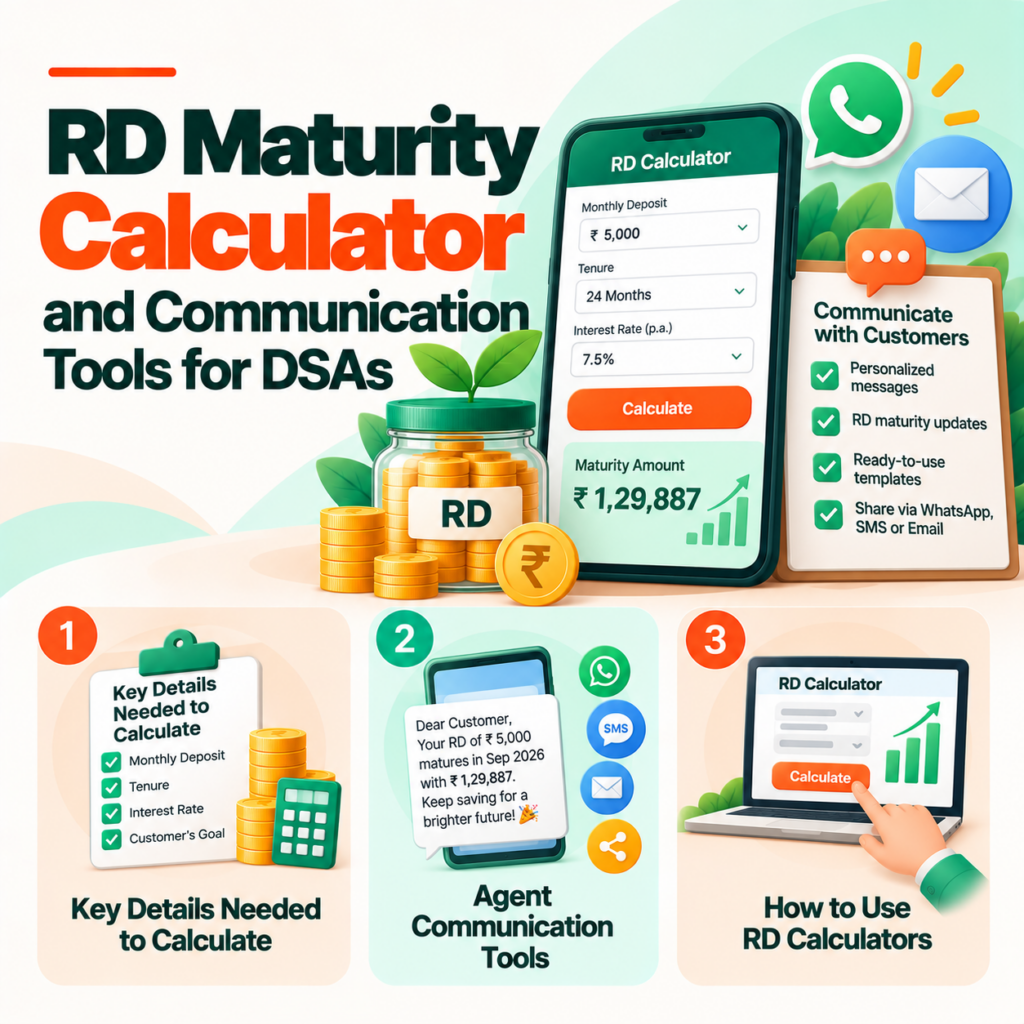
Key Details Needed to Calculate RD Returns
To get the correct RD maturity value, you need the right inputs. Below are the key details.
| Input | What It Means | Why It Matters |
| Monthly deposit | The fixed amount you save each month | A bigger deposit gives bigger returns |
| Interest rate | The yearly rate the bank offers | A higher rate means more RD interest |
| Tenure | The length of the RD in months or years | A longer time allows more growth |
| Compounding | How often interest is added (usually quarterly) | More frequent compounding adds more interest |
| Customer type | Regular or senior citizen | Senior citizens often get a higher rate |
Besides these, always check for any penalty rules. For example, if a customer misses a deposit, the bank may charge a fee. Furthermore, if the customer breaks the RD early, the rate may drop. As mentioned earlier, the numbers can change from bank to bank. Therefore, always confirm the details first.
Why DSAs Should Use an RD Calculator
A DSA talks to many customers every day. Time is short, and trust is key. An RD calculator helps on both fronts.
First, it saves time. You do not need to work out sums on paper. Second, it lowers errors. A tool gives the same correct answer each time. Third, it builds trust. When customers see numbers on a screen, they feel more confident.
In addition, a calculator helps you compare plans. For instance, you can show the RD returns for 12 months and for 24 months side by side. As a result, the customer can choose with ease.
Likewise, the tool helps you handle doubts. Some customers think RDs give too little. However, when they see their own numbers, they often change their view. Above all, the calculator turns a vague idea into a clear picture.
Agent Communication Tools for Explaining RD Returns
A good calculator is only half the job. You must also share the result well. This is where agent communication tools come in.
These tools help agents talk to customers in a fast and clear way. Below are some common types.
- WhatsApp Business: You can send the RD result as a short message. Moreover, you can share a screenshot of the calculation.
- Chatbots: A chatbot can ask for the deposit, rate, and tenure. Then it replies with the RD maturity amount right away.
- Message templates: Ready-made texts save time. Besides that, they keep your tone the same every time.
- Email and SMS tools: These help you send follow-ups and reminders after the first talk.
- Video call apps: You can share your screen and show the calculator live.
Meanwhile, keep your message short. Customers do not read long texts. Therefore, share only the key numbers: monthly deposit, tenure, RD interest, and maturity amount.
Further, save your best messages as templates. For example, you can keep one for a 12-month RD and one for a 24-month RD. Consequently, you can reply within seconds.
How to Use RD Calculators in Customer Conversations
Using the tool in a talk needs a plan. Follow the steps below.
- Start with the goal. Ask the customer why they want to save. It could be a trip, a gadget, or an emergency fund.
- Ask about the budget. Find out how much they can save each month.
- Enter the details. Type in the deposit, the rate, and the tenure.
- Show the result. Share the RD maturity amount and the interest earned.
- Try other options. Change the tenure or the amount and show the new result.
- Send a summary. Use WhatsApp or email to share the final numbers.
Next, let the customer take part. For example, ask them to pick the monthly amount. Similarly, ask which tenure feels right for them. Because of this, they feel in control. Then, they trust you more.
Finally, follow up after a day or two. A short reminder can help a customer decide. In short, a calculator and a good message work best together.
Tips to Explain RD Maturity Clearly to Customers
Simple words win every time. Here are some tips to help you.
- Use plain language. Say “the money you get at the end” instead of “maturity proceeds.”
- Use real numbers. Say “₹5,000 a month for one year” instead of “a fixed sum.”
- Show the deposit and the interest apart. For instance, “You put in ₹60,000. You earn about ₹2,300 extra.”
- Use small examples. Besides making things easy, they help customers picture the plan.
- Repeat the key point. As mentioned earlier, the customer should know the total deposit, the interest, and the final amount.
- Be honest about limits. Moreover, tell customers that rates can change.
Similarly, watch the customer’s face or tone. If they look lost, slow down. On the other hand, if they ask deeper questions, share more details. Above all, stay patient and polite.
Common Mistakes to Avoid When Using an RD Calculator
Even a simple tool can lead to errors. Here are the most common ones.
1. Using an old interest rate. Banks change rates from time to time. Hence, always check the latest rate.
2. Ignoring compounding rules. Some tools use quarterly compounding, while others use a different method. Therefore, confirm which one applies.
3. Promising exact returns. The calculator gives an estimate. Do not call it a guarantee.
4. Forgetting about tax. Interest on RDs may be taxable. Also, banks may deduct TDS in some cases. So, mention this to the customer.
5. Skipping the penalty rules. Missed deposits and early exits can cost money. Thus, explain these points at the start.
6. Sharing too many numbers. Too much data confuses people. Instead, share only what matters.
Besides these, never compare two banks without checking both rates. Otherwise, the comparison will not be fair.
Conclusion
An RD calculator makes saving plans easy to understand. It shows RD maturity, RD interest, and RD returns in seconds. Moreover, it helps DSAs save time and avoid errors.
Still, the tool is only the start. You must also explain the results clearly and honestly. Therefore, use good agent communication tools like WhatsApp, chatbots, and message templates. Similarly, keep your language simple and your numbers real. To become a loan agent, sell RD, FD & FD credit cards, & to earn more, join WeRize & start your DSA journey. Start small, stay patient, and grow steadily.
In short, a calculator plus clear communication builds trust. As a result, customers feel sure about their choice, and DSAs close more conversations with confidence.